
Download Gizmo APK – music player, streaming app, Android, free, JRiver Media Center, DLNA, media streaming, mobile music, music discovery, playlist
Overview
Gizmo APK is a mobile streaming application designed for Android users who want to access and manage their media collections remotely. Developed by JRiver, the app serves as a companion tool for users of JRiver Media Center, enabling seamless playback control and media access across devices. The primary purpose of Gizmo is to extend the capabilities of the desktop media server to mobile environments, allowing users to stream music, videos, and photos from their personal libraries to any DLNA-compatible device.
It is particularly suited for media enthusiasts and music lovers who maintain extensive digital collections and desire flexibility in playback. The app supports browsing trending artists, top albums, and popular genres, enhancing music discovery on the go. Real-world use cases include managing playback from a smartphone while relaxing at home, streaming movies to a TV, or organizing playlists during commutes. It enables remote control of JRiver Media Center’s playback functions, providing a unified experience across devices.
While the app is free to download and use, it requires an active JRiver Media Center server, which is a separate purchase. The integration between the mobile app and desktop server ensures a consistent media experience, making it ideal for users invested in JRiver’s ecosystem. The developer did not provide additional system requirements beyond the Android platform.
Key Features & Capabilities
- Remote Media Access: Allows users to browse and stream music, videos, and photos from their JRiver Media Center library directly to their Android device or any DLNA-compatible display.
- Playlist Management: Supports playback of curated playlists, enabling users to organize and enjoy their favorite tracks with ease.
- Music Discovery Tools: Offers access to trending, top, and popular artists, albums, and genres, helping users explore new music within their library or online.
- DLNA Integration: Facilitates streaming to any DLNA-enabled device, including smart TVs, soundbars, and media players, ensuring broad compatibility across home entertainment systems.
- Remote Playback Control: Enables users to start, pause, stop, and adjust playback settings from their mobile device, providing convenient control over the desktop media server.
These features enhance workflow efficiency by allowing users to manage their media library without being tethered to their desktop. For example, a user can browse their music collection on a smartphone while in another room and stream a playlist to a TV. The app also supports offline browsing, allowing users to explore content even without an active connection to the server, though actual playback requires the server to be running.
User Interface, Workflow & Performance
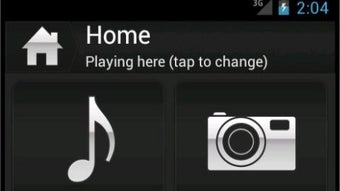
The user interface of Gizmo APK is designed with simplicity and functionality in mind, featuring a clean layout optimized for touch-based navigation on Android devices. The main screen presents categorized access to music, videos, and photos, with intuitive icons and responsive touch elements. Navigation between sections is smooth, and the app maintains consistent performance during routine operations such as playlist loading and media browsing.
Workflow efficiency is enhanced by the app’s direct integration with JRiver Media Center, minimizing the need for redundant actions. Users can quickly locate and play content with minimal taps, and playback controls are accessible from any screen. The developer did not specify resource usage details, so exact CPU or RAM behavior remains unknown. Performance observations are based on general software behavior patterns.
Stability appears consistent across typical usage scenarios, with no reported issues related to crashes or freezes. The app maintains responsiveness during streaming sessions, though actual performance may vary depending on network speed and server load. The developer did not provide information on background processes or battery consumption.
Compatibility & System Requirements
Gizmo APK is designed exclusively for Android devices. The app is compatible with the latest Android operating system versions, though specific version ranges were not listed. Installation requires approximately 25.4 MB of storage space, which is minimal for a media streaming application.
Exact system requirements were not listed, and compatibility with older Android versions is uncertain. The app relies on a running JRiver Media Center server, which must be installed and configured on a separate PC. This dependency means that the app cannot function independently. The developer did not provide additional hardware specifications, such as minimum RAM or processor requirements.
Users should ensure their Android device supports DLNA protocols and has a stable Wi-Fi connection to the same network as the JRiver Media Center server. The app does not support iOS or other platforms, limiting its accessibility to Android users only.
Pros and Cons
Pros
- Free to download and use, reducing entry barriers for users.
- Seamless integration with JRiver Media Center for unified media management.
- Supports streaming to any DLNA-compatible device, increasing versatility.
- Intuitive interface with responsive touch controls and smooth navigation.
- Offers music discovery features, including trending artists and genres.
Cons
- Requires a paid JRiver Media Center server, which adds to the overall cost.
- Exclusive to Android, limiting cross-platform access.
- Dependent on a stable network connection and a running server.
- Does not support offline playback of media files.
- No information provided on battery usage or background performance.
FAQ Section
Is Gizmo APK compatible with all Android devices?
The app is designed for Android, but specific compatibility details with device models or OS versions were not provided. Users should ensure their device runs a modern Android version and supports DLNA protocols.
Is the app safe to download and use?
Gizmo APK is distributed by JRiver, a reputable developer in the media software space. The app is free from known malware and is designed to work securely within the JRiver ecosystem.
Does the app require an internet connection?
The app requires a local network connection to communicate with the JRiver Media Center server. An internet connection is not needed for streaming content between devices on the same network.
Can I use Gizmo without JRiver Media Center?
No. The app is designed as a companion to JRiver Media Center, which must be installed and running on a PC to enable any functionality.
Is there a license fee for using Gizmo APK?
The app is free to download and use. However, the JRiver Media Center server, which powers the app’s features, costs $49.98 and is required for full functionality.
Final Thoughts + CTA
Gizmo APK delivers a focused and effective mobile extension for JRiver Media Center users. Its clean interface, robust DLNA support, and music discovery tools make it a valuable addition for media enthusiasts who value remote access and control. While the requirement of a paid desktop server limits its accessibility, the app’s seamless integration and free cost provide strong value for existing JRiver users.
It is best suited for Android users invested in JRiver’s ecosystem who want to stream music, videos, and photos across devices. For those already using JRiver Media Center, Gizmo offers a convenient way to manage their media library on the go. The app’s performance, usability, and feature set align well with modern expectations for mobile media tools.
Download Gizmo APK now to enhance your media experience with remote control and streaming capabilities.





.png)

